
Facilities where machinery powers production also house hidden risks. A single misstep during maintenance—like failing to isolate an energy source—can lead to catastrophic injury. The lockout tagout (LOTO) log PDF isn’t just paperwork; it’s a legal and operational safeguard. OSHA mandates documented energy control procedures, and the log is the backbone of that compliance. Without a clear, accessible, and consistently used LOTO log, even the most rigorous safety training falls short.
A lockout tagout log PDF serves as a real-time record of who locked out equipment, when, why, and when it was safely re-energized. It’s more than a checklist—it’s an audit trail that protects workers and shields organizations from liability. In this guide, we’ll break down the essential components of an effective log, where to get reliable templates, and how to avoid common implementation failures.
What Belongs in a Lockout Tagout Log PDF?
A high-quality lockout tagout log PDF must capture critical data points to be both useful and compliant. Generic forms with minimal fields fail under inspection. Use this checklist to evaluate or build your template:
- Equipment ID or Name: Specific identifier (e.g., “Conveyor Line 3,” “Hydraulic Press A”)
- Date and Time of Lockout: Exact start of isolation
- Authorized Employee Name: Person applying the lock
- Department or Shift: Context for workflow tracking
- Nature of Work: Brief description (e.g., “belt replacement,” “motor inspection”)
- Energy Sources Isolated: Electrical, pneumatic, hydraulic, gravity, etc.
- Lock and Tag Numbers: Unique identifiers tied to each device
- Time of Restoration: When energy was safely re-energized
- Verification Signature: Confirmation by supervisor or lead technician
Missing any of these elements creates compliance gaps. For instance, if only “machine maintenance” is listed under work type, an auditor can’t assess risk control accuracy. Be specific.
Real-World Example: At a Midwest food processing plant, an injury occurred when a grinder was re-energized mid-maintenance. The log showed a lockout entry, but no tag numbers or verification. Investigators found multiple unauthorized unlocks—proof that incomplete logs enable dangerous assumptions.
How to Use a LOTO Log PDF in Daily Operations
A PDF log only works if it's integrated into workflows—not buried in a folder. Here’s how facilities actually use them:
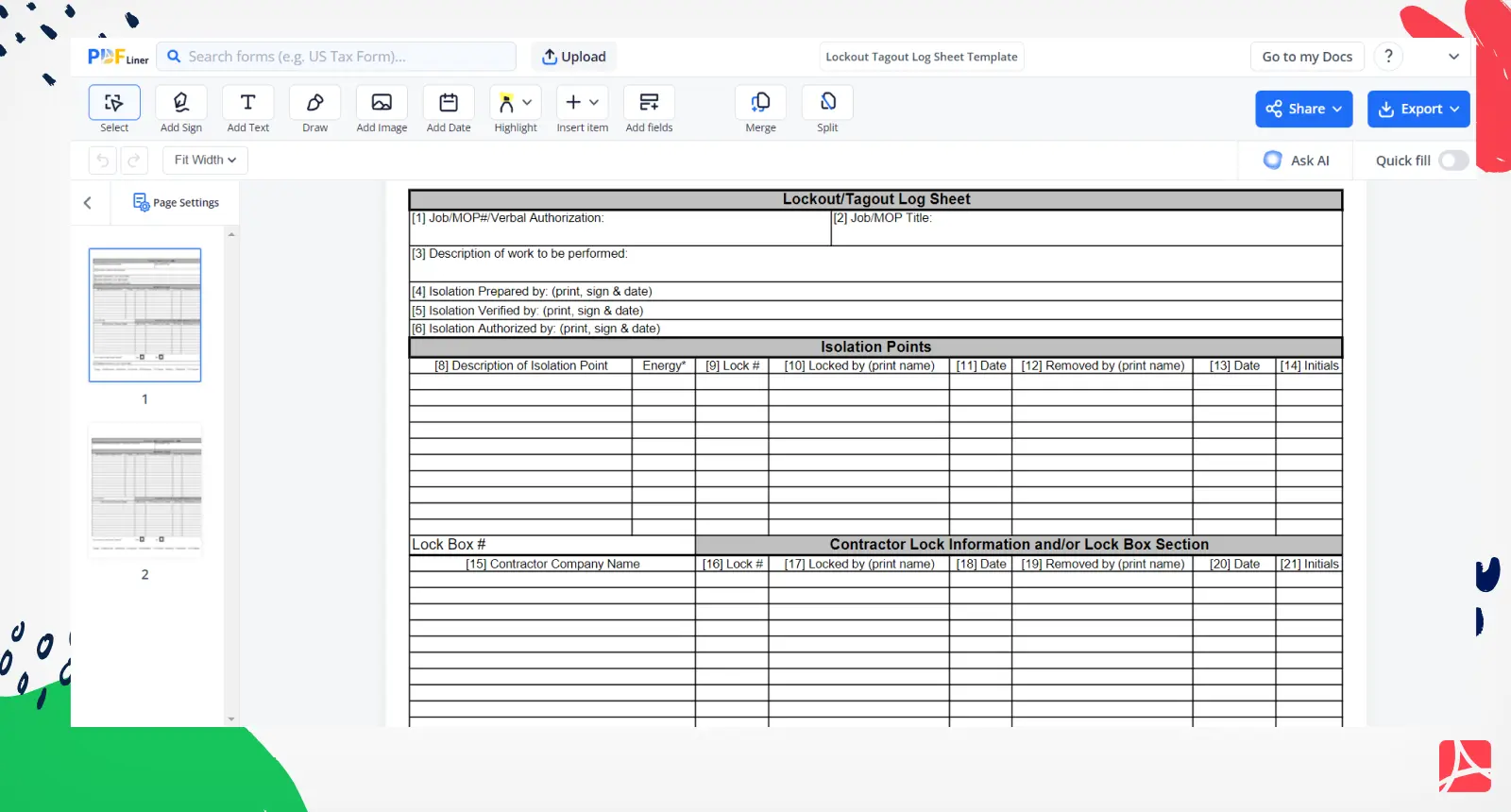
- Pre-Work Briefing: Before maintenance, the lead technician prints or pulls up the digital LOTO log.
- Document Each Step: As locks and tags are applied, the form is filled in real time.
- Centralized Access: Logs are stored in a shared drive or printed at station boards for visibility.
- Post-Work Review: After re-energization, a supervisor signs off and archives the log.
- Monthly Audits: Safety officers review logs to spot trends or missed steps.
Digital vs. paper logs? Both work, but digital versions (fillable PDFs) allow for faster retrieval, editing, and backups. Just ensure they’re password-protected and accessible offline during power outages.
Pro Tip: Color-code logs by department or hazard level. Red for high-risk machinery (e.g., CNC presses), yellow for medium (e.g., packaging lines). Visual cues speed up emergency response.
Common LOTO Log Mistakes That Risk Compliance
Even with a solid template, misuse undermines safety. Watch for these recurring issues:
- Backdating Entries: Filling logs after the fact defeats their purpose. Real-time documentation is required.
- Shared Locks or Tags: OSHA prohibits shared control devices. Each worker must apply their own lock.
- Vague Equipment Descriptions: “Machine in Room 2” isn’t enough. Use asset tags or serial numbers.
- Skipping Verification: No signature after re-energization means no confirmation of safety checks.
- Lost or Unarchived Logs: Missing logs = no proof of compliance during audits.
Case Study: A chemical plant faced a $92,000 OSHA fine after an inspection revealed 40% of LOTO logs were unsigned or incomplete. The root cause? Workers treated logs as “busywork” due to poor training and inconvenient access.
Fix this by pairing the log with hands-on training and making the form part of the job clearance process—no form, no work.
Where to Get Reliable Lockout Tagout Log PDF Templates
Not all PDF templates are created equal. Many free versions online lack OSHA-aligned fields or are poorly formatted for printing. Below are five vetted, ready-to-use options:
| Template Source | Format | Key Features | Best For |
|---|---|---|---|
| OSHA.gov | Basic, compliant with 29 CFR 1910.147 | Quick compliance baseline | |
| SafetyCulture (iAuditor) | Fillable PDF + App | Cloud sync, photo uploads, analytics | Digital-first teams |
| Creative Safety Supply | Editable PDF | Visual layout, multilingual support | High-traffic facilities |
| EcoOnline | PDF + LMS integration | Training pairing, audit trails | Enterprise safety programs |
| ClickSafety | Free downloadable PDF | OSHA-reviewed fields, printer-friendly | Small to mid-sized shops |
Choose based on your workflow. If your team uses tablets on the floor, go digital. If printers are more reliable, pick a clean, single-page PDF.
Customizing Your LOTO Log PDF for Specific Equipment
One-size-fits-all logs fail with complex machinery. Tailor your form to match equipment risk profiles.
For example:
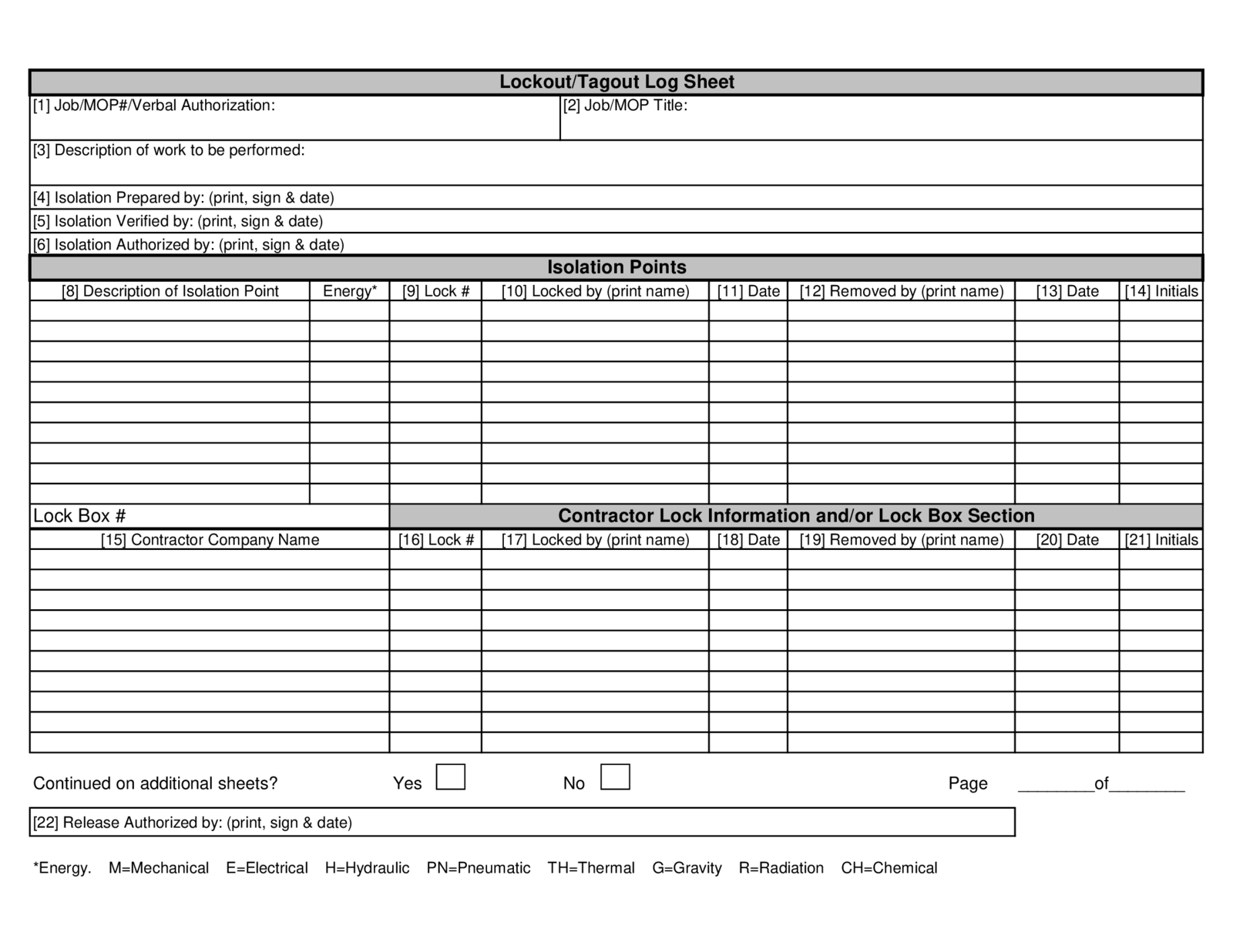
- High-Risk Equipment (e.g., industrial saws): Add fields for PPE verification, pre-lockout inspection notes, and emergency contact.
- Multi-Energy Systems (e.g., automated lines): Include a checklist of all energy types isolated.
- Batch Processes (e.g., reactors): Note process stage (e.g., “post-drain, pre-cleaning”) to prevent premature restart.
Practical Use Case: A pharmaceutical plant modified their LOTO log PDF to include “validation step” for cleanroom mixers. This ensured QA staff signed off before power return, preventing contamination.
Use Adobe Acrobat or PDF editors like PDFescape to add checkboxes, dropdowns, or company branding. Just don’t remove mandatory compliance fields.
How Often Should You Update or Audit LOTO Logs?
OSHA requires annual program audits, but logs should be reviewed far more frequently. Here’s a realistic schedule:
- Daily: Supervisors scan logs for completion before shift handoff.
- Weekly: Safety leads check for recurring errors (e.g., missing times).
- Monthly: Full review of 10–20% of logs for compliance depth.
- Annually: Formal audit with third-party or internal safety officer.
During audits, look for patterns—not just errors. If three technicians on Night Shift skip tag numbers, it’s a training gap, not negligence.
Workflow Tip: Use a rotating audit log. Attach it to the LOTO form bundle so reviewers initial after inspection. Creates accountability without extra meetings.
Integrating LOTO Logs with Broader Safety Systems
A standalone PDF won’t transform safety culture. It must connect to other processes:
- Maintenance Management Software: Sync lockout logs with work orders in CMMS platforms like Fiix or UpKeep.
- Incident Reporting: If an injury occurs, cross-reference the LOTO log to trace procedure adherence.
- Training Records: Tie log usage to employee certification dates. Expired training? Block log access.
- Emergency Response Plans: Include log storage location in emergency playbooks.
Facilities using integrated systems report 60% fewer LOTO-related incidents (EHS Today, 2023). The data connection matters.
Real Benefit: A auto parts manufacturer linked their PDF logs to their digital twin system. When a robot was locked out, the dashboard turned red enterprise-wide—preventing remote restart attempts.
Final Thoughts: Make Your Lockout Tagout Log PDF a Living Document
A lockout tagout log PDF isn’t a formality. It’s a frontline defense against injury and non-compliance. But only if it’s accurate, accessible, and actively used.
Start with a compliant template—preferably fillable and field-tested. Train your team not just on how to fill it out, but why each field matters. Audit regularly, correct quietly, and reward diligence. When a log is treated as a tool, not a task, safety becomes habitual.
Download a proven template today, customize it for your machines, and make it part of every maintenance workflow. Your team’s safety—and your compliance standing—depends on it.
Frequently Asked Questions
What is a lockout tagout log PDF used for? It documents when and how machinery is isolated for maintenance, ensuring worker safety and OSHA compliance.
Is a digital LOTO log PDF acceptable for audits? Yes, if it’s secure, tamper-proof, and includes all required fields. Always back up digital files.
Who should fill out the LOTO log? The authorized employee performing the lockout procedure must complete the log in real time.
How long should LOTO logs be kept? OSHA recommends at least one year, but high-risk industries often keep them for 3–5 years.
Can I modify a free LOTO log PDF template? Yes—customize it for your equipment, but ensure all OSHA-mandated fields remain.
Do I need a separate log for each machine? No, one log can cover multiple machines if entries are clearly separated and detailed.
What happens if a LOTO log is incomplete? It can invalidate your energy control program during an audit and increase liability after an incident.
FAQ
What should you look for in Lockout Tagout Log PDF: Free Templates & Best Practices? Focus on relevance, practical value, and how well the solution matches real user intent.
Is Lockout Tagout Log PDF: Free Templates & Best Practices suitable for beginners? That depends on the workflow, but a clear step-by-step approach usually makes it easier to start.
How do you compare options around Lockout Tagout Log PDF: Free Templates & Best Practices? Compare features, trust signals, limitations, pricing, and ease of implementation.
What mistakes should you avoid? Avoid generic choices, weak validation, and decisions based only on marketing claims.
What is the next best step? Shortlist the most relevant options, validate them quickly, and refine from real-world results.



